PHP2Shell: What your IT team needs to know
4 min read
Read article →How Data Vault, erwin Data Modeler, and MODGEN automate the modeling of staging areas and raw vaults.
Data warehouse projects have traditionally struggled with long implementation times. This increases the chance that business requirements will change while the project is still under way, putting schedule and budget goals at risk. A highly systematic model such as Data Vault offers substantial potential for automation.
Dan Linstedt developed Data Vault to shorten implementation times and make data warehouses easier to adapt to change. Its central design principle separates business keys, contextual information, and relationships into dedicated table types:
This separation offers several advantages:
By separating information types and adding load metadata, Data Vault creates a very large number of tables and columns. Modeling effort increases even though much of the work consists of straightforward, mechanical steps.
That systematic structure is also what makes generation practical. When derivation rules can be described unambiguously, large parts of the modeling process can be automated and projects accelerated substantially.
A typical data warehouse architecture includes the following layers:
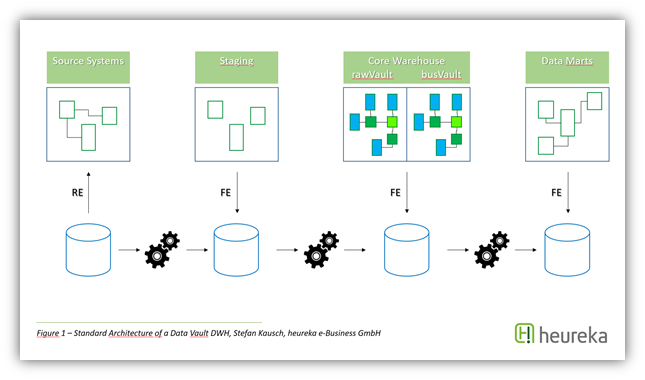
The staging area and raw vault can be derived from their preceding layers using clear rules.
The staging area and raw vault are particularly suitable for automation because their structures can be generated from the preceding model through well-defined rules.
Specialized data warehouse automation products address this potential directly. A standard modeling tool such as erwin Data Modeler offers a different set of strengths:
The MODGEN add-in was developed to provide model-based generation within erwin. It integrates into the erwin interface and uses a workflow closely aligned with Complete Compare.
MODGEN provides capabilities including:
An iterative modeling process needs to be repeatable. MODGEN therefore compares the source and target model during every generation run. It displays differences and lets users select which changes to apply. The process remains round-trip capable as models are extended repeatedly.
Generation covers not only tables and columns as horizontal model structure. For every target column, it also documents the relationship to its source column as a data source. This provides a basis for producing source-to-target mappings. When source and target models are integrated into the Web Portal, the same information becomes available for impact and lineage analysis.
Talk to our experts about your specific challenges. We provide honest assessments and actionable recommendations.
Practical implementation
Discuss your current situation with heureka. Together, we can clarify priorities, ownership, and the most useful place to start.
4 min read
Read article →14 min read
Read article →12 min read
Get the checklist →