PHP2Shell: What your IT team needs to know
4 min read
Read article →Generate a modular data administration interface automatically from an erwin data model.
erwin Data Modeler can model entities and columns and generate SQL changes through forward engineering. That still leaves one question unanswered: How should end users create, find, and update data in the new tables?
heureka developed a dynamic data management system for this purpose: an administration interface for maintaining data. A dedicated application imports the erwin model, enriches it with metadata, and automatically generates a graphical interface.
Model-based generation offers three principal advantages:
The process starts with the physical data model. It is exported as an XML file containing the complete structural information. Tables and columns can be augmented through user-defined properties (UDPs). This metadata controls features such as which elements are visible in search. Fundamental presentation properties can be assigned through domains.
The application imports the XML file and presents every detected change in a structured list. New entities, modified values, column lengths, and other relevant differences become visible. Users can review the changes and cancel the import if necessary.
After import, metadata can be adapted to the needs of end users. Entities with many-to-many relationships can, for example, be made accessible from more than one location. Individual columns can display supplementary information.
Additional project-level settings are available. These include user management, connection to an LDAP server for centralized authentication, logging of subsequent data changes, and multilingual labels.
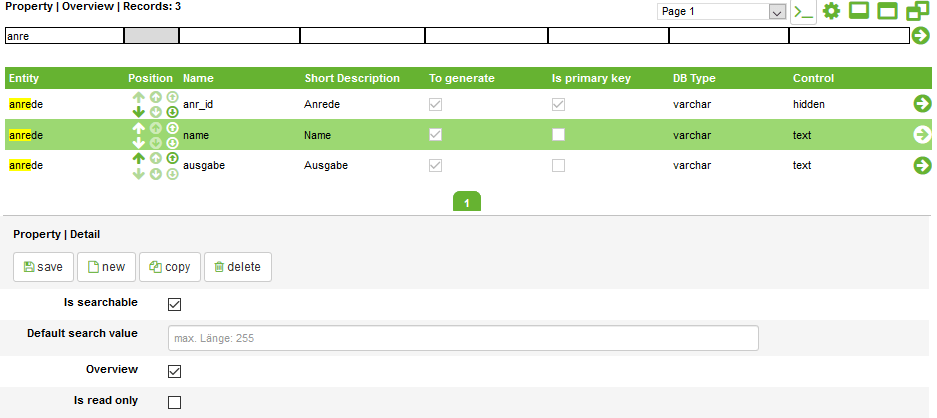
The generated administration interface combines model metadata with a consistent data-maintenance experience.
A JSON file is generated for each entity and for the project itself. All generated files can be downloaded as a compact ZIP archive and included in the corresponding project. The JSON documents contain the presentation information and are supplemented with individual permissions from the database.
This configuration controls the pages used to edit data. There is no longer a need to program every administration page manually.
On first use, the application loads the relevant project JSON and updates its settings. From this point onward, each administration interface is individual: not only the appearance but also the business logic can be adapted to the project.
Potential capabilities include:
This approach quickly creates a modular interface with little manual programming. It can be adapted to business requirements while retaining a consistent interaction model.
Talk to our experts about your specific challenges. We provide honest assessments and actionable recommendations.
Practical implementation
Discuss your current situation with heureka. Together, we can clarify priorities, ownership, and the most useful place to start.
4 min read
Read article →14 min read
Read article →12 min read
Get the checklist →