PHP2Shell: What your IT team needs to know
4 min read
Read article →Query, extend, and automate SolarWinds Orion with SWIS, SWQL, PowerShell, and SWIS verbs.
The Software Development Kit for SolarWinds Orion is a collection of tools for extending the monitoring platform. It primarily supports custom solutions in PowerShell and Python, but it can also be used independently through SOAP and REST. The Orion SDK is available on GitHub.
The SolarWinds Information Service (SWIS) is a central interface for querying and modifying Orion data. It provides the SolarWinds Query Language (SWQL), a SQL-like query language. The underlying SWIS data schema is documented online.
The following PowerShell example finds applications containing a component monitor named get mountpoints. It then identifies the associated nodes and displays their names and IDs:
Add-PSSnapin SwisSnapin;

$swis = Connect-Swis;

# Name of the application monitor
$ComponentName = "get mountpoints";

# Get application IDs for applications containing the component monitor
[string]$sAppIDs = Get-SwisData $swis "SELECT ApplicationID FROM Orion.APM.Component WHERE Name = @name" @{name = $ComponentName};
$aAppIDs = $sAppIDs.Split(" ");

Write-Output "Found $($aAppIDs.Length) Application(s) with Component";

ForEach ($sAppID in $aAppIDs) {
    # Get its node ID and name
    $nodeID = Get-SwisData $swis "SELECT NodeID FROM Orion.APM.Application WHERE ApplicationID = @AppID" @{AppID = $sAppID};
    $NodeName = Get-SwisData $swis "SELECT NodeName FROM Orion.Nodes WHERE NodeID = @node;" @{node = $nodeID};
    Write-Output "Node ID: $($nodeID) Name: $($NodeName)";
}
The PowerShell snap-in must be installed before the script runs. The Orion SDK's PowerShell documentation explains the setup.
SWIS uses SolarWinds credentials and honors the permissions of the relevant user. The interface also isolates clients from direct database-schema changes, helping provide a consistent data model for integrations.
The SDK installation includes SWQL Studio for building queries.
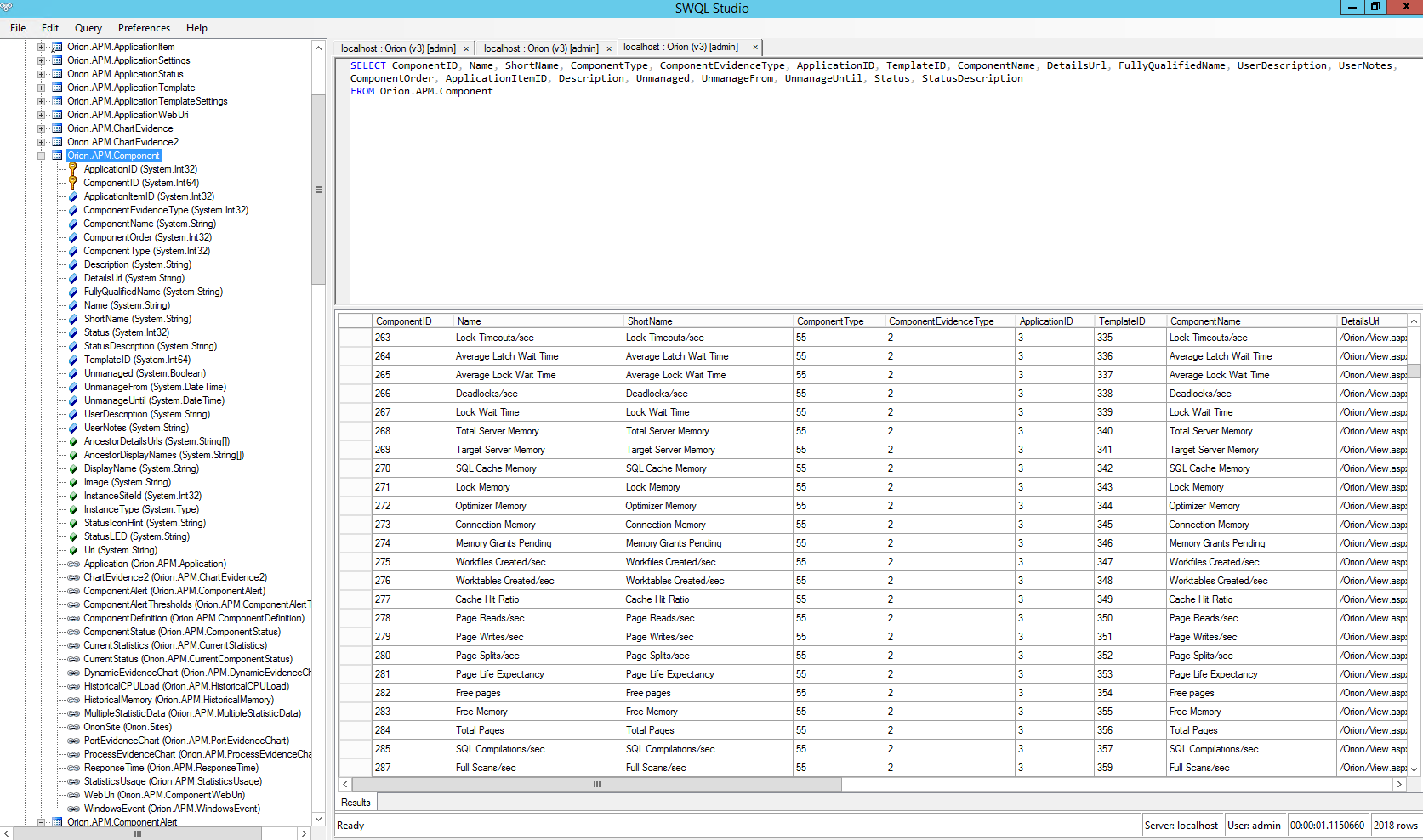
In addition to read-only SWQL queries, SWIS exposes functions for CRUD operations. They can be called through the PowerShell snap-in, Python client, SOAP, or REST, although they are not implemented for every Orion data type.
SWIS functions use a SWIS URI to select an object:
$swisUri = 'swis://localhost/Orion/Orion.Nodes/NodeID=$nodeID/Volumes/VolumeID=$volumeId';
SWIS verbs execute common Orion actions directly from scripts. The following example temporarily removes a node from monitoring.
First, SWQL is used to find the node ID:
SELECT NodeID, Caption, Status, StatusDescription
FROM Orion.Nodes
WHERE Caption LIKE '%Test%';
Example result:
NodeID  Caption     Status  StatusDescription
78      Testserver  1       Node status is Up.
The ID is then supplied to Invoke-SwisVerb. The dates from the historical example are intentionally retained:
Add-PSSnapin SwisSnapin;

$swis = Connect-Swis;
[datetime]$timestampNow = "01.09.2017";
[datetime]$timestampLater = "12.09.2017";

Invoke-SwisVerb $swis Orion.Nodes Unmanage @("N:78", $timestampNow, $timestampLater, "false");
The node is removed from monitoring at the first timestamp and added again at the second. Running the query again reports status 9, “Unmanaged.”
The arguments accepted by a verb can be queried from metadata in SWQL Studio:
SELECT EntityName, VerbName, Position, Name, Type, IsOptional
FROM Metadata.VerbArgument
WHERE VerbName = 'Unmanage'
  AND EntityName = 'Orion.Nodes';

Another SWQL query lists the verbs supported by a particular installation:
SELECT Name, EntityName
FROM Metadata.Verb;
The Orion SDK wiki is the main starting point for productive use of the tools. The SWIS schema and THWACK community provide additional reference material and support.
Talk to our experts about your specific challenges. We provide honest assessments and actionable recommendations.
Practical implementation
Discuss your current situation with heureka. Together, we can clarify priorities, ownership, and the most useful place to start.
4 min read
Read article →14 min read
Read article →12 min read
Get the checklist →